Portfolio Website
Designing a portfolio for documenting projects, experiments, and technical writing

Overview
This portfolio website was built to showcase projects, experiments and technical writing across software, data, and AI.
Rather than using a template or website builder, the site is implemented as a statically generated application using Next.js and React, with a custom content pipeline based on Markdown and typed metadata.
Projects and articles are written as markdown files and automatically rendered into pages, allowing new content to be added without modifying the application code.
Motivation
As I started building more projects, I wanted a portfolio that could do more than display screenshots and links.
Many portfolio sites rely on static pages or templates, which makes it difficult to maintain consistent project documentation or add new work over time.
Instead, I wanted the site to behave more like a developer documentation system, where projects and writing can be added simply by creating structured content files.
This approach keeps the site flexible and makes it easy to expand as new projects and articles are added.
Key Features
Markdown-based content system
Projects and articles are written as markdown files with structured metadata. This allows new content to be added without modifying the application code.
Typed metadata validation
Project metadata such as title, summary, technology stack, and links are validated through TypeScript interfaces to ensure consistent structure across the site.
Static page generation
Next.js generates static pages for each project and article during build time, producing a fast and lightweight site.
Reusable component system
Project cards, layout sections, and navigation components are implemented as reusable React components to maintain a consistent structure across the site.
Syntax highlighting and rich markdown support
Code blocks and technical content are rendered using a markdown pipeline that supports syntax highlighting, GitHub-style markdown features, and linkable headings.
Content System
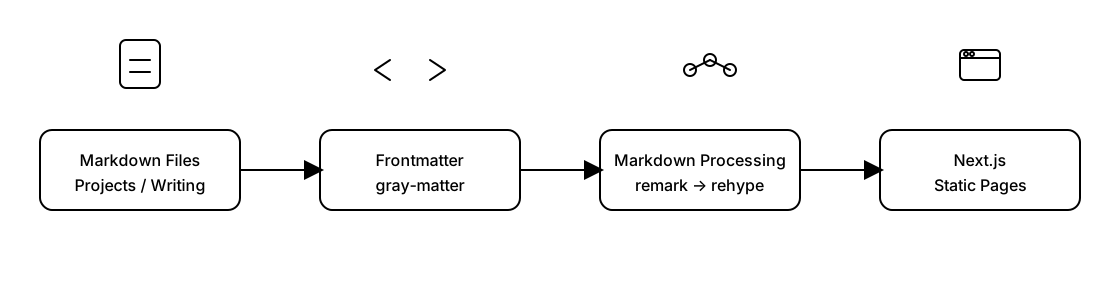
The site uses Next.js static generation combined with a custom content pipeline. The architecture separates the site into three main layers.
Content Layer
Projects and writing are stored as Markdown files inside the repository. Each file a structured metadata block (frontmatter) which includes title, summary, date, technology stack, and external links.
This structure allows content to remain readable and version-controlled.
Content Processing
During build time, a content loader reads the markdown files, parses the metadata using gray-matter, and converts markdown into HTML using a remark-based pipeline.
Plugins provide additional functionality such as syntax highlighting, GitHub-flavoured markdown, and automatic heading anchors.
Presentation Layer
React components render the processed content into project pages, writing pages, and homepage sections such as featured projects.
This separation between content and presentation makes the site easy to extend as new sections or features are added.
Design
The site focuses on a minimal layout designed to highlight projects and writing without visual clutter. Key design elements include:
- a custom hero illustration
- a featured projects section on the homepage
- project pages with consistent structure
- typography and spacing designed for readability
The layout prioritizes clear storytelling around projects rather than visual complexity.
Challenges
Designing flexible project metadata
Projects on the site range from systems programming to browser extensions and data science experiments. A challenge was designing metadata that could describe very different projects while remaining consistent enough for the site to generate project cards and pages automatically.
The solution was to define a core metadata schema including fields such as title, summary, technology stack, and links. Additional optional fields allow projects to include extra information without breaking the content pipeline.
Balancing structure with writing flexibility
Markdown provides flexibility for writing long-form explanations, but project pages also require structure for consistent rendering across the site.
The content system therefore separates structured metadata (used for layout and navigation) from the markdown body (used for narrative and documentation).
Building a Markdown rendering pipeline
Rendering markdown into production-ready HTML required building a small processing pipeline using several libraries: The pipeline parses frontmatter metadata using gray-matter, converts Markdown into an abstract syntax tree using remark, and then transforms it into HTML using rehype. Additional plugins enable GitHub-style markdown, syntax highlighting, linkable headings, and support for raw HTML inside markdown.
What I Learned
Building this portfolio reinforced the importance of treating documentation as part of the engineering process.
Instead of relying on static pages, the site behaves like a small publishing system where content is separated from layout and generated automatically. This approach makes it easier to maintain and extend the site as new projects and writing are added.
The project also provided an opportunity to explore modern frontend tooling with Next.js while designing a system that can evolve over time as my work grows.